Best AI Apps for Teachers in 2026 - Lesson Planning, Grading & Student Engagement Tools

TL;DR for Busy Teachers
Nearpod - AI lesson creation + real-time assessment data
Kahoot! - Gamified review with engagement metrics
Canva for Education - Free professional visual content creation
NotesXP - Convert lecture notes → student study materials (mindmaps, flashcards, quizzes)
Google Classroom - Unified classroom hub with AI grading assistance
Teams Copilot - Comprehensive AI assistant for planning and collaboration
Let's be real about teaching in 2025: You're drowning in administrative work.
Between grading stacks of assignments, creating lesson materials, writing individualized feedback, managing parent communication and actually teaching-something has to give. Most teachers report spending 10+ hours per week on work outside classroom hours and burnout has never been higher.
That's where AI-powered teaching tools come in. These aren't gimmicks. They're legitimate workflow tools that automate the time-consuming parts of teaching-grading, lesson planning, content creation, student engagement tracking-so you can focus on what matters: teaching and connecting with students.
I've tested the top AI tools with teachers across different subjects and grade levels. Here are the ones that genuinely save time and improve student outcomes.
Why Teachers Need AI Tools Now
The numbers tell the burnout story
The Teacher Time Crisis
Teachers report that 70% of their non-teaching time goes to grading, planning and administrative tasks. The remaining 30% covers parent communication, professional development and classroom management. There's almost no buffer-one crisis derails the entire week. AI tools can reclaim 5+ hours weekly, directly addressing the #1 cause of teacher burnout.
What AI Can Actually Do for Teachers
Beyond the hype: real time-saving applications
Time-Saving Applications
- Grading: AI generates initial feedback; you personalize (saves 3-5 hrs/week)
- Lesson Planning: AI suggests activities and assessments (saves 2-3 hrs/week)
- Content Creation: Templates and AI-generated designs (saves 1-2 hrs/week)
- Communication: AI drafts emails; you edit (saves 30 mins/week)
Combined impact
5-11 hours/week
reclaimed time with strategic AI tool use
That's an entire workday back. For yourself.
Instruction & Assessment
Nearpod auto-generates interactive lessons and formative assessments from your content. Real-time data shows which students understand.
Engagement & Motivation
Kahoot gamifies review and assessment. 100% student participation, instant performance data and intrinsic motivation through competition.
Content & Materials
Canva creates professional visuals. NotesXP converts lectures into student study materials. Zero design skills needed.
In-Depth Analysis of Top 6 AI Apps for Teachers (2026)
How each tool addresses specific teacher challenges. Tested by real educators across subjects and grade levels
Nearpod
The Lesson Creation & Real-Time Assessment Powerhouse
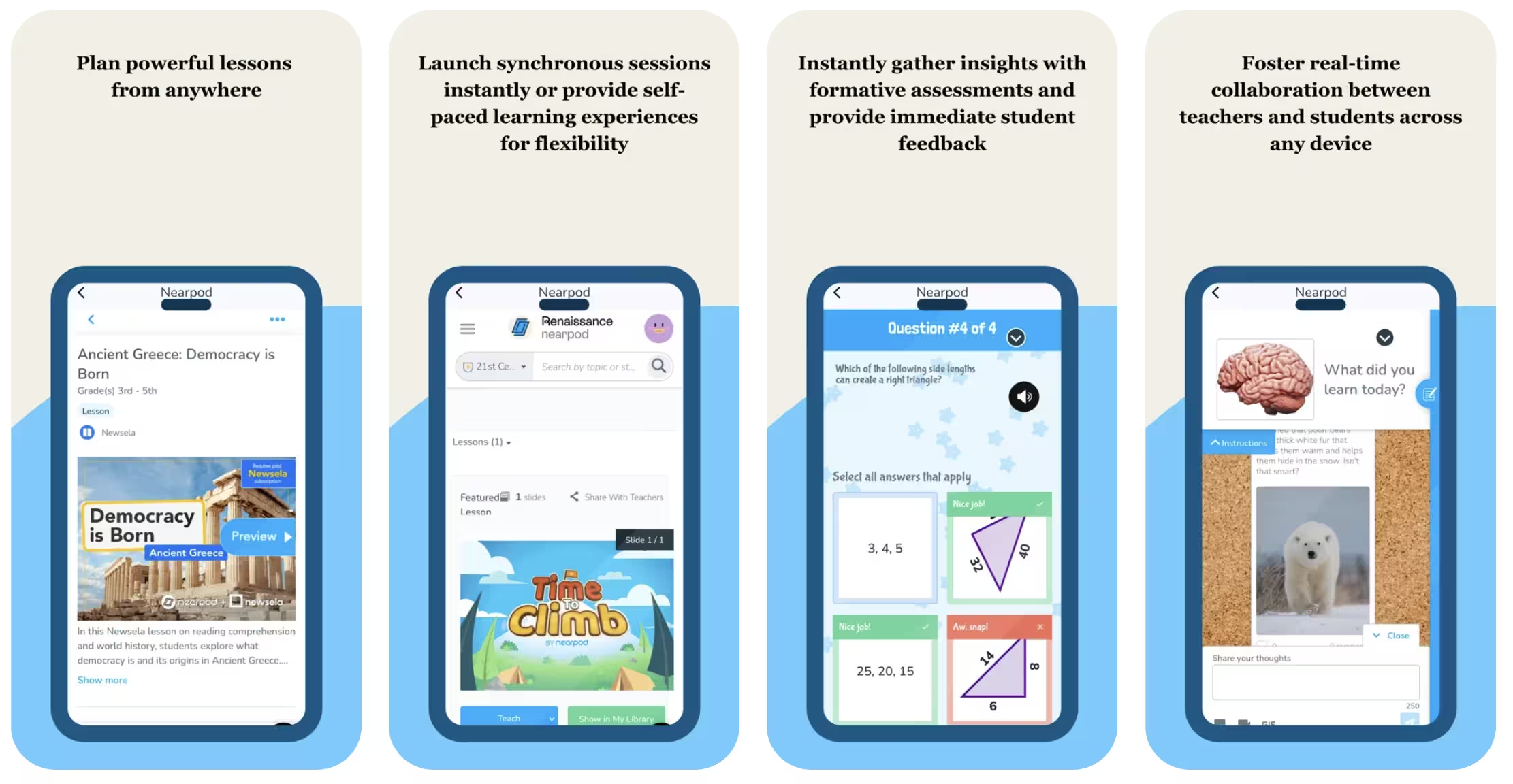
Why teachers are switching to Nearpod: Nearpod transforms lesson planning with AI-powered lesson generation and real-time student assessment. Teachers upload content and Nearpod automatically creates interactive slides with built-in formative assessments that adapt to student responses.
Perfect Because:
- AI Lesson Creation: Upload a textbook chapter or topic, get a complete interactive lesson with slides and assessments in minutes
- Real-time insights: See which students understand concepts as they answer, adjust instruction on the fly
- Formative assessment automation: Auto-generated questions save hours of assessment creation
- Works hybrid: Perfect for in-person, remote or blended learning setups
Real Use Cases:
Math Instruction
Upload problem sets → Nearpod creates interactive step-by-step lessons → Real-time feedback shows who needs help → Auto-adjust pacing
Science Concepts
Input complex topics (photosynthesis, genetics) → Generate visual interactive lessons → Real-time assessment shows misconceptions → Intervention ready
Language Arts
Upload texts and discussion prompts → AI creates comprehension checks → Real-time polling and discussion facilitation
Pros
- AI creates polished lessons in minutes, not hours
- Real-time assessment data helps you teach smarter
- Formative assessments auto-grade and provide insights
- Excellent for differentiating instruction on the fly
- Strong LMS integrations (Canvas, Google Classroom, Schoology)
- 92% of users report improved student engagement
Cons
- Premium features require paid subscription for full power
- Requires reliable internet connection
- Steep learning curve for advanced customization
- Free tier has limited AI features
- Takes time to master all capabilities
Best Nearpod Strategy for Teachers
Start with the free tier to create one Nearpod lesson per week. Combine with Canva for creating supplementary materials and Google Classroom for grading. Use Nearpod's real-time data to identify struggling students, then create targeted practice with Kahoot.
Testimonial
"I was spending 2-3 hours every night creating lesson slides and coming up with questions to check for understanding. It was absolutely brutal. With Nearpod's AI, I upload content and have a complete interactive lesson with assessments in 15 minutes. The real-time data is game-changing-I can literally see who's confused during the lesson and adjust immediately instead of finding out on a test. My prep time dropped from 3 hours to 30 minutes a night. I'm getting my life back."- Michael J., High School Physics Teacher
Kahoot!
The Student Engagement & Gamification Champion
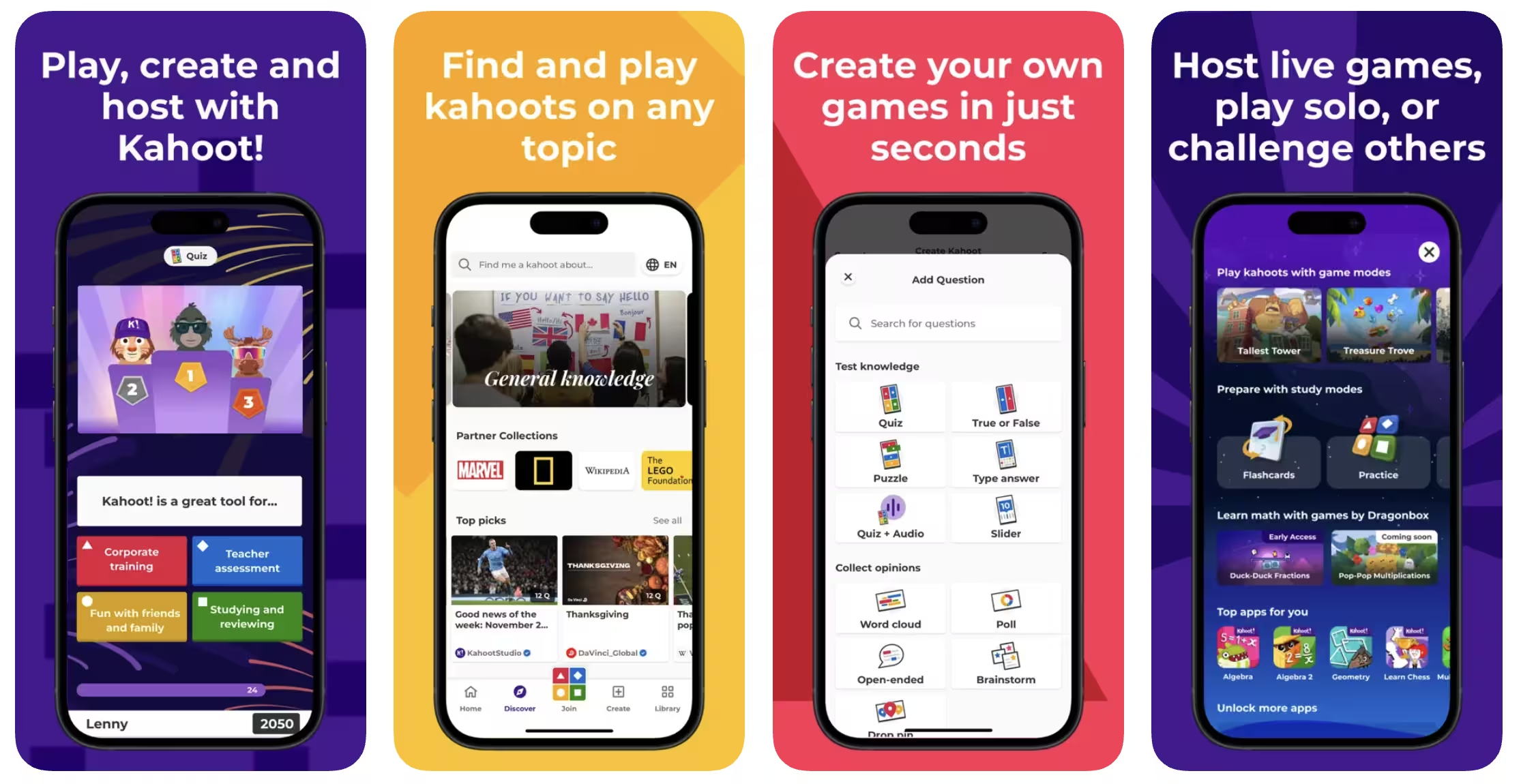
Why teachers swear by gamification: Kahoot transforms assessment into game-based learning where students compete in real-time quiz competitions. It combines engagement with data insights, making review sessions energetic and effective.
Perfect Because:
- 100% student participation: Every student is engaged simultaneously in game competition mode
- Real-time feedback: See results instantly; identify misconceptions immediately
- Massive question library: Browse millions of pre-made kahoots across subjects and grades
- Motivates disengaged learners: Competition and rewards increase buy-in from struggling students
Real Use Cases:
Weekly Review Sessions
Create a 10-question kahoot covering the week's material → 20-minute game session → Get immediate performance data → Target gaps next week
Formative Checks
Quick 5-question kahoot to check understanding mid-lesson → Students stay alert → You get data to adjust instruction
Test Prep
Build cumulative review kahoots → Use throughout unit for reinforcement → Students see patterns before summative assessment
Pros
- Incredible engagement-even reluctant learners participate
- Super easy to create quizzes or use pre-made ones
- Detailed reporting shows which questions students miss most
- Free tier is robust and usable
- Mobile-friendly for BYOD classrooms
- Students can play asynchronously (self-paced mode)
- Works great for review and test prep
Cons
- Requires devices for all students (not ideal for resource-limited schools)
- Can feel trivial for serious academic content if overused
- Premium features ($3+/month) unlock full potential
- Not ideal for deep learning or complex problem-solving
- Needs reliable WiFi during play
Best Kahoot Strategy for Teachers
Use Kahoot 1-2x per week for focused review, not daily instruction. Create kahoots aligned to your summative assessments so students see tested content as familiar. Use data to identify which standards need reteaching. Combine with Nearpod for instruction and Google Classroom for deeper work.
Testimonial
"I was losing students on Friday afternoons-everyone was checked out. I started using Kahoot for review and suddenly Friday came alive. My quietest students were shouting answers, my struggling students were actually trying because it felt like a game not a test. The best part? I saw exactly which concepts they hadn't mastered. I went from "hope they get it" to knowing precisely what to reteach. Test scores went up 12% in my first year of consistent Kahoot use."- Angela K., Middle School Science Teacher
Canva for Education
The Free Visual Content Creation Powerhouse

Why every teacher needs Canva Education: Canva democratizes professional design. Teachers create stunning lesson materials, presentations, infographics, posters and even videos without design skills. The Education plan is completely free for verified teachers.
Perfect Because:
- 100% free for verified teachers: No watermarks, unlimited designs, full feature access
- No design skills needed: Drag-and-drop templates make professional materials in minutes
- Complete content suite: Presentations, worksheets, posters, social graphics, videos, flashcards
- Student collaboration: Free license for students means they can create too
Real Use Cases:
Lesson Materials
Create beautiful worksheets, anchor charts and classroom posters → Download and print or project → Professional look with zero effort
Student Projects
Have students create presentations, posters, or infographics in Canva → Teaches design thinking while meeting standards
Social Media Content
Create engaging graphics for class Instagram, newsletter images, parent communication visuals
Pros
- Completely free for verified teachers (best deal in the industry)
- Zero learning curve-templates guide you through design
- Millions of templates for every subject and grade level
- Students get free accounts too (collaborative learning)
- Beautiful output looks professionally designed
- AI features: Magic Resize, Remove Background, Magic Eraser
- Video editing capabilities built in
- All file formats: PDF, PNG, video, etc.
Cons
- Requires internet connection (no desktop app)
- Watermark if using free tier (but teachers get full access)
- Learning curve for advanced features like animations
- Some features hidden in menus (not immediately obvious)
- Large file uploads can be slow
Best Canva Strategy for Teachers
Use Canva to create all visual classroom materials: worksheets, posters, presentation slides and exit tickets. Have students use Canva for project-based learning. Combine with Nearpod for interactive lessons and Kahoot for review. Your classroom will look professionally designed.
Testimonial
"I used to spend forever trying to make materials look decent. Either they looked amateur or I'd have to pay for design tools. Canva changed everything. I click a template, swap the text, download and I have a beautiful worksheet or poster that looks like I hired a designer. The fact that it's FREE is insane. My classroom looks more professional, my students actually want to use the materials because they're visually engaging and I'm spending that time on actual teaching."- Rebecca M., Elementary Teacher
NotesXP
The Ultimate Teacher-to-Student Study Bridge
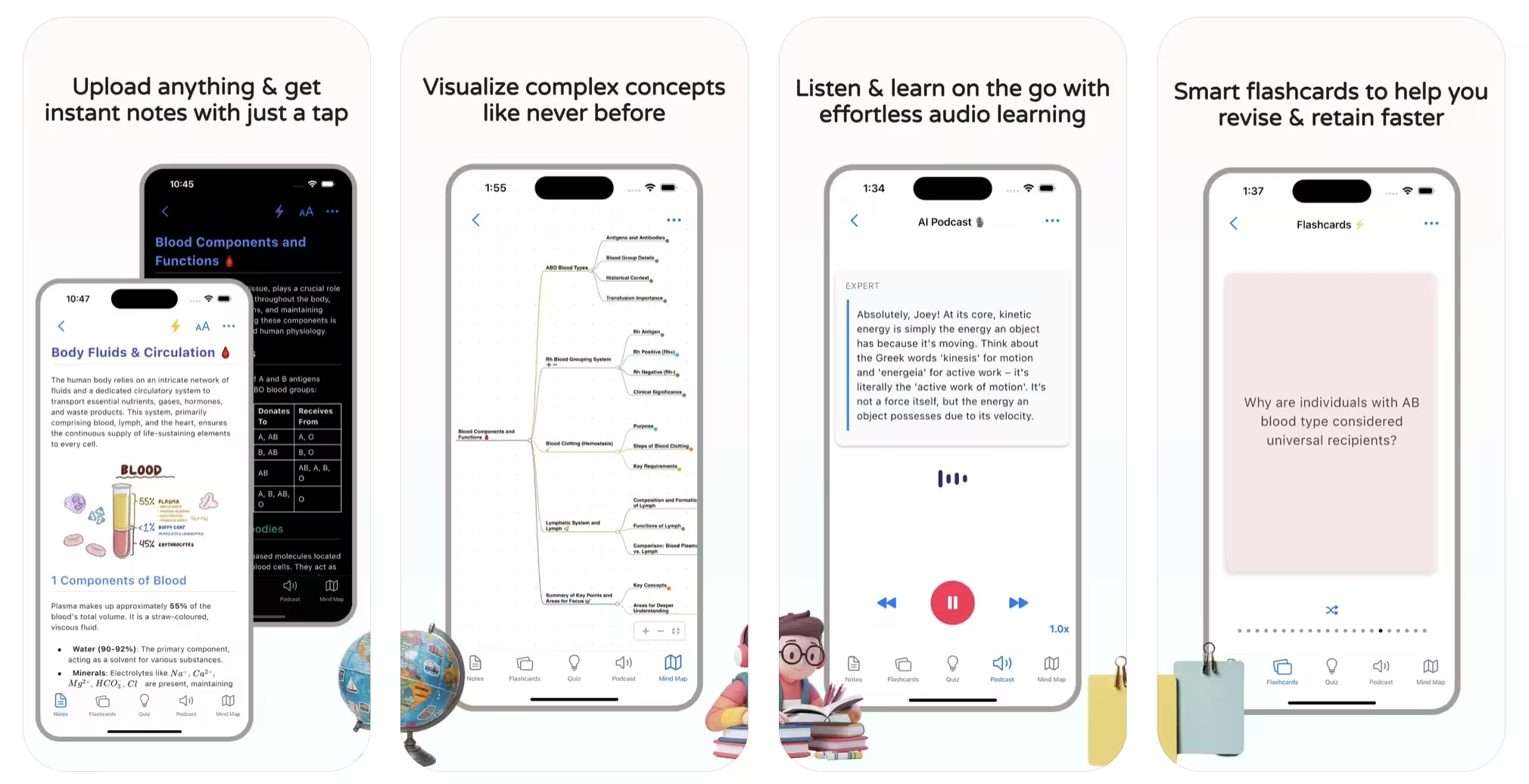
Why teachers and students love NotesXP: NotesXP is more than a note converter, it’s a teacher’s secret weapon for turning any lesson, handout, or resource into interactive, student-friendly study materials in minutes. Instantly transform your PowerPoints, PDFs, handwritten notes, or even audio and video recordings into mindmaps, flashcards, quizzes, and study guides. No account required, works fully offline, and designed for privacy and accessibility in real classrooms.
Perfect Because:
- All-in-one conversion: Instantly turn any teaching material slides, worksheets, textbook pages, or even voice memos into multiple study formats (mindmaps, flashcards, quizzes, summaries)
- Visual learning made easy: AI-generated mindmaps help students see connections and structure, making complex topics accessible for all learning styles
- Offline & privacy-first: Works 100% offline, no account or student data required, ideal for privacy-conscious schools and exam settings
- Multi-format input: Handles PDFs, images, handwritten notes, audio, video, and even YouTube lectures
- Real teacher impact: Teachers report saving 5+ hours per week and seeing higher student engagement and test scores
Real Use Cases:
From Any Source to Study-Ready
Upload your lesson slides, textbook chapters, or even a photo of the whiteboard → Instantly get mindmaps, flashcards, quizzes, and a study guide to share with students
Personalized Review Materials
Create differentiated study sets for students who need extra support or enrichment, no extra prep time required
Test Prep & Revision
Compile unit content → Generate comprehensive, visually organized study guides and quizzes → Students study smarter, not just harder
Pros
- Instantly creates multiple study formats from any source
- AI-powered mindmaps for deep understanding
- Works fully offline, no account or internet needed
- Handles all content types (text, images, audio, video, handwritten)
- Privacy-focused and FERPA/GDPR-friendly
- Reduces teacher workload and burnout
- Boosts student engagement and independent learning
- Multilingual and folder organization for diverse classrooms
Cons
- Premium unlocks advanced features
- Smaller teacher community (but growing rapidly)
- Some advanced customization has a learning curve
- Limited pre-made content library (but easy to create your own)
Best NotesXP Strategy for Teachers
After each unit, upload your core teaching materials, notes, or recordings into NotesXP and instantly generate mindmaps, flashcards, quizzes, or a study guide. Share with students before tests or for homework. Combine with Kahoot for review and Google Classroom for distribution. Teachers report reclaiming entire weekends and seeing students actually use and benefit from the materials.
Testimonial
"I used to spend entire weekends making study guides, flashcards, and quizzes for my students. With NotesXP, I upload my PowerPoint and in minutes have mindmaps, flashcards, and quizzes that my students actually use. Test scores went up, and I finally have my Sundays back. The offline mode and privacy focus are huge for our district. This is the first tool my students thank me for introducing."- Chris D., High School History Teacher
Google Classroom with Gemini AI
The Grade Management & AI Grading Assistant
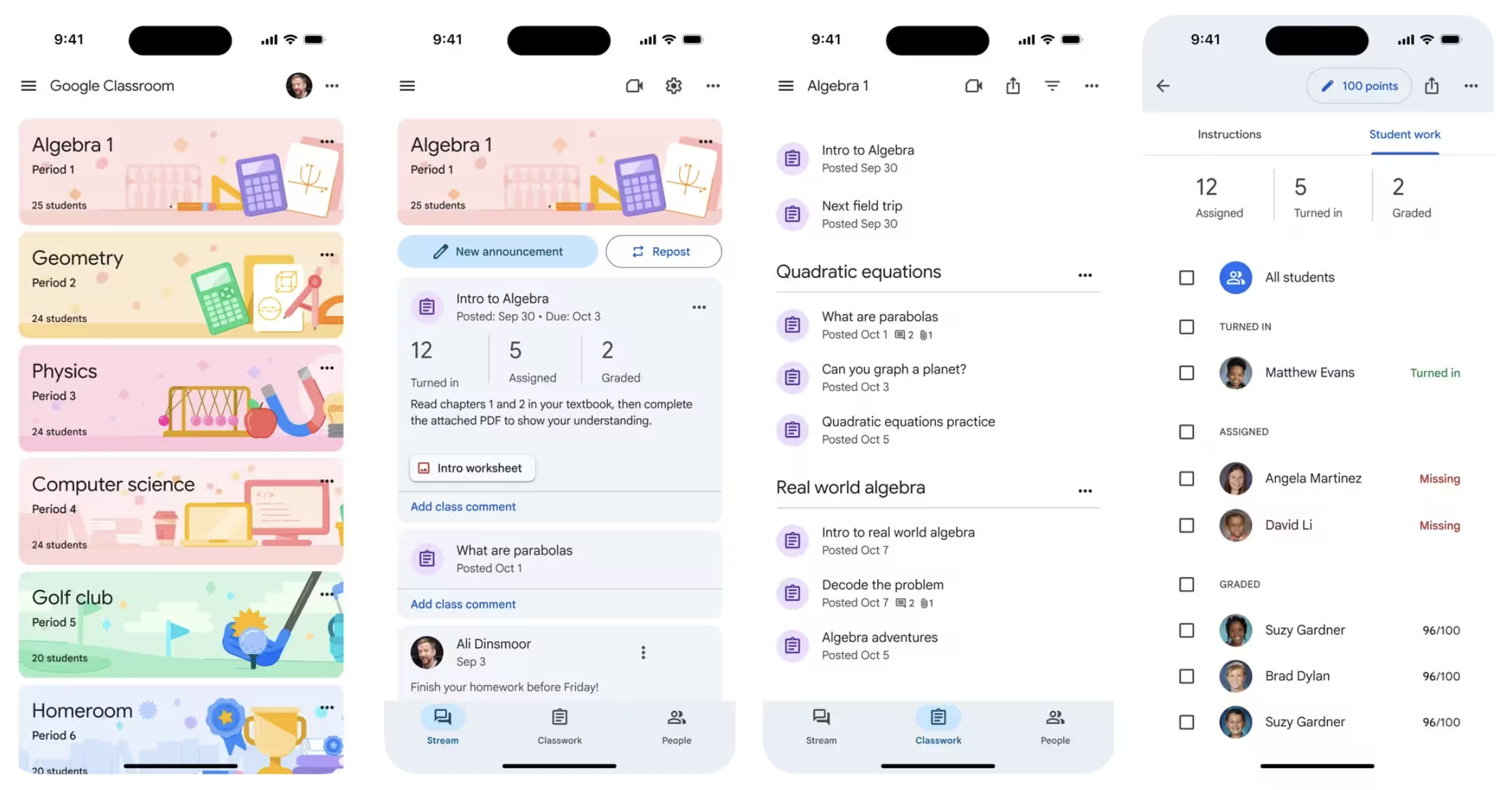
Why Google Classroom is becoming AI-powered: Google Classroom is the backbone of modern K-12 teaching. The latest AI features powered by Gemini automate grading, generate feedback and create assignment variations tailored to student needs.
Perfect Because:
- AI-assisted grading: Gemini helps generate feedback and grades for assignments, saving 3-5 hours/week
- Magic Compose: AI helps draft professional emails to parents and students
- Seamless Google integration: Works with Docs, Sheets, Forms making the workflow frictionless
- Universal adoption: Most schools already use it; minimal setup friction
Real Use Cases:
Assignment Management
Create assignments → Students submit in Google Classroom → AI generates initial feedback → You refine and finalize → Students see comments
Auto-Graded Quizzes
Create Google Form quiz → Attach to Classroom → Auto-grades multiple choice → Identify patterns in student misconceptions
Parent Communication
Use Magic Compose to draft progress emails → AI helps articulate concerns professionally → Send updates in bulk
Pros
- Free for all K-12 schools (already adopted in 90%+ of districts)
- AI grading feedback saves significant teacher time
- Seamless integration with entire Google Workspace
- Accessible anywhere with internet
- Strong privacy and security (meets FERPA standards)
- Real-time gradebook with progress tracking
- Works in hybrid and fully remote settings
Cons
- Requires Google Workspace for school (not available standalone)
- AI grading features still developing and require refinement
- Can become disorganized if not managed carefully
- Limited offline functionality
- Steep learning curve for teachers new to LMS systems
Best Google Classroom Strategy
Use Google Classroom as your command center. Combine with Nearpod for instruction, Kahoot for review, Canva for materials and NotesXP for student study guides. Let Gemini help with grading feedback and parent communication. This ecosystem handles everything.
Testimonial
"Google Classroom was already our hub, but adding AI-assisted grading took it to another level. I used to spend 2 hours grading a stack of writing assignments, writing individualized feedback for each student. Now I can generate initial feedback in minutes, then personalize for each student. It's not perfect-I still review everything-but it cuts my grading time roughly in half. Between that and Magic Compose helping me draft parent emails, I'm getting back 5+ hours every week."- Dana L., Elementary Literacy Coach
Microsoft Teams for Education with Copilot
The Comprehensive Classroom Collaboration Hub
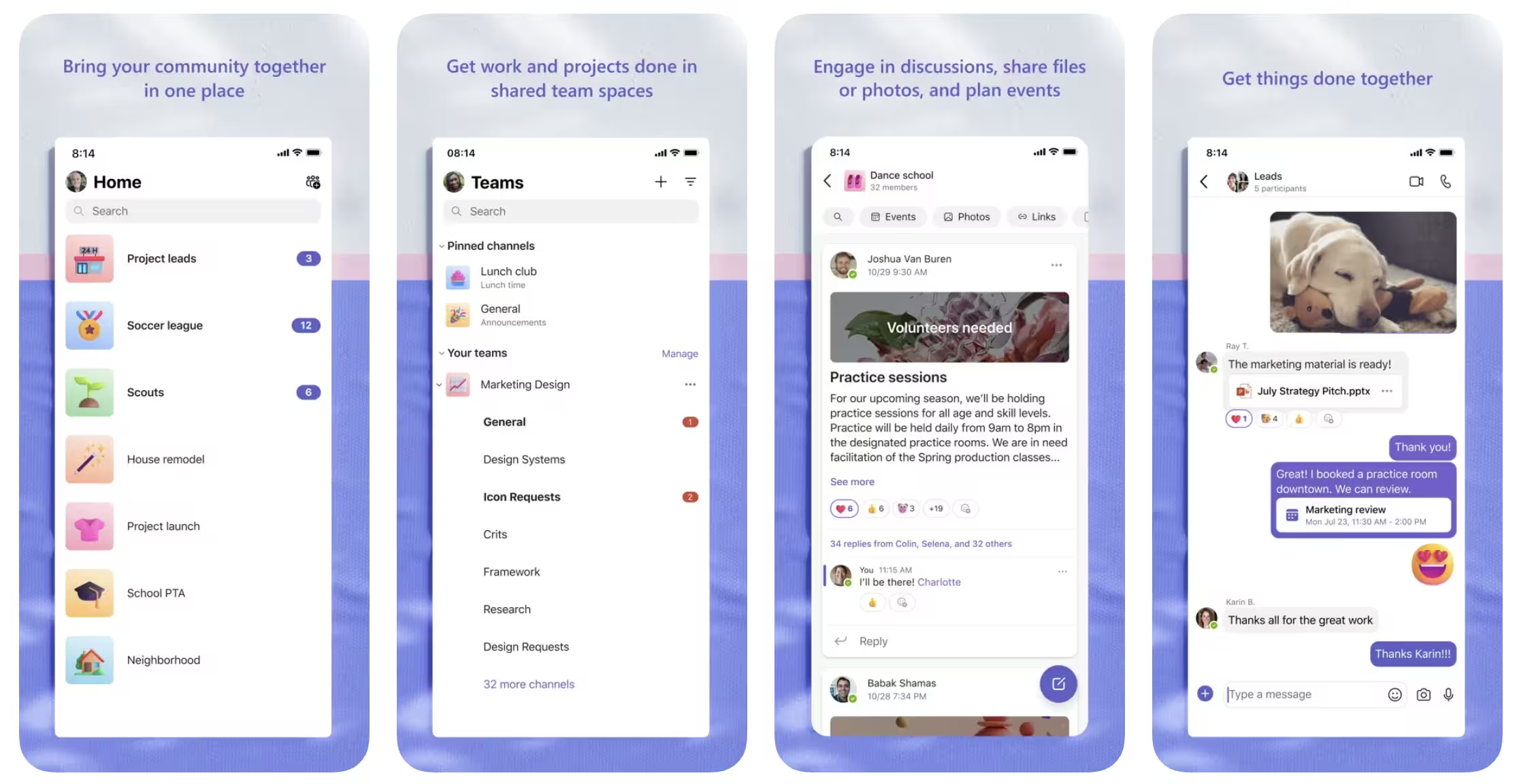
Why Microsoft Teams is becoming the classroom operating system: Microsoft Teams for Education provides a unified platform for classroom management, collaboration and communication. Copilot integration adds AI-powered lesson planning, assignment creation and student support.
Perfect Because:
- Copilot assistance: AI helps with lesson planning, assignment design and creating learning resources
- Everything in one place: Assignments, chat, video conferencing, OneNote, file sharing
- Seamless Microsoft integration: Works with Office 365, OneNote and institutional tools
- Strong accessibility: Built-in support for diverse learners with caption generation and real-time translation
Real Use Cases:
Lesson Planning with Copilot
Describe lesson goals to Copilot → Get learning objectives, activities, assessments → Customize and deploy
Collaborative Assignments
Create assignment in Teams → Students collaborate in shared OneNote or Doc → Real-time feedback in Teams chat
Accessible Learning
Record lessons with automatic captions → Translate to student home languages → AI summarizes key points
Pros
- Copilot integration helps with all classroom planning tasks
- Unified workspace reduces tool fatigue
- Excellent accessibility features (captions, translation, summaries)
- Free for K-12 schools
- Strong video conferencing for hybrid learning
- Integrates with institutional IT infrastructure
- OneNote is underrated for student portfolios
Cons
- Complex interface can overwhelm new users
- Steep learning curve for teachers unfamiliar with Teams
- Copilot features still maturing and require refinement
- Requires institutional adoption (not standalone)
- Can be overwhelming with too many communication channels
Best Teams Strategy for Teachers
Use Teams as your central classroom hub. Use Copilot to help plan lessons and create assignments. Embed Nearpod lessons in Teams for instruction. Use Canva for visuals. Let Teams handle communication, collaboration and file management. Add Kahoot in Teams for review sessions.
Testimonial
"When Teams added Copilot to education, I was skeptical about yet another AI thing. But I tried using it to plan a tricky unit on climate systems that I always struggle to make engaging. I described what I wanted students to understand and Copilot generated learning objectives, suggested interactive activities, created assessment questions and recommended resources. Did I use everything? No. But it gave me a solid framework in 10 minutes instead of the 3 hours I usually spend planning that unit. It's like having a brainstorming partner available instantly."- James T., High School Earth Science Teacher
Feature Comparison: Which App Fits Your Workflow?
Side-by-side breakdown of key features for different teaching needs
| Feature | Nearpod | Kahoot | Canva | NotesXP | Google Classroom | Teams Copilot |
|---|---|---|---|---|---|---|
| AI Lesson Generation | ✓ AI Create | ✓ AI Questions | ✗ | ✓ Content to Study | ✓ Gemini | ✓ Copilot |
| Auto Grading | ✓ Formative | ✓ Basic | ✗ | ✗ | ✓ Yes | ✓ Yes |
| Student Engagement | ✓ Interactive | ✓ Gamified | ✓ Visual | ✓ Interactive | ✓ Good | ✓ Good |
| Content Creation | ✓ Interactive | ✗ Quizzes only | ✓ Full Suite | ✓ Study Materials | ✓ Limited | ✓ Limited |
| Offline Access | ✗ Limited | ✓ Yes | ✓ Yes | ✓ Full | ✗ Limited | ✗ Limited |
| Learning Curve | Easy | Very Easy | Very Easy | Easy | Very Easy | Medium |
| Price for Teachers | Free tier | $3-19/mo | Free (verified) | Free + Premium | Free | Free |
The Ultimate Teacher Workflow Strategy
Combine apps strategically for maximum efficiency and student impact
The Recommended Teacher Tech Stack
Foundation: Google Classroom
Your management hub. All assignments, grades and communication flow through here. Gemini AI helps with grading and parent emails.
Time saved: 3-5 hours/week on grading and communication
Instruction: Nearpod
Create interactive lessons from your content. Get real-time assessment data. Adjust instruction on the fly based on student understanding.
Time saved: 2-3 hours/week on lesson planning and formative assessment creation
Engagement: Kahoot
1-2x per week for focused review. Gamification keeps students engaged. Data shows exactly which standards need reteaching.
Time saved: 1 hour/week on review planning; better performance data
Content: Canva + NotesXP
Canva for all visual materials (worksheets, posters, presentations). NotesXP to convert lecture notes into student study guides, mindmaps and quizzes.
Time saved: 2-3 hours/week on material creation; better student study materials
Pro Tip: Start with Google Classroom + Nearpod. Master these two, then add Kahoot for review. Add Canva and NotesXP when you want to enhance materials. Start with what works; iterate from there.
Expected Impact
- ✓ 5-11 hours/week reclaimed (enough for actual planning or personal time)
- ✓ Better student data to inform instruction (real-time assessment insights)
- ✓ Improved engagement (gamification + interactive materials)
- ✓ Reduced burnout (automation handling the repetitive work)
Pricing Breakdown: Budget-Friendly Solutions
Many teacher AI tools are free or extremely affordable
Nearpod
- Premium plans available: Free
Kahoot!
- Per month (billed annually): $3
Canva for Education
- For verified teachers: FREE
NotesXP
- Plus Premium options: Free
Google Classroom
- With Google Workspace: FREE
Microsoft Teams
- Basic; Microsoft 365 for more: FREE
Cost Reality Check
Free tier: Google Classroom + Canva (verified teachers) + Kahoot free tier = Completely free
Recommended tier: Add Nearpod free tier (~$0/month) = Still free
Full premium tier: All apps with premium features (~$25-50/month) = Less than most textbook adoptions
Frequently Asked Questions
Common questions from teachers implementing AI tools
Final Recommendations: Your Next Steps
Based on your role and immediate needs
Pick Google Classroom + Nearpod if:
- Start with Google Classroom (free) and let Gemini generate initial feedback
- Add Nearpod (free tier) for formative assessments that auto-grade
Pick NotesXP + Canva if:
- Use NotesXP (free) to convert your lecture notes into study guides and flashcards
- Add Canva (free for teachers) for visual enhancements
Pick Kahoot + Nearpod if:
- Add Kahoot (free/paid) for weekly review sessions
- Combine with Nearpod for interactive instruction that keeps students attentive
Pick Microsoft Teams Copilot if:
- Use Microsoft Teams Copilot (free for schools)
- It handles planning, instruction, assignment management and collaboration all integrated
Your 2026 Teaching Transformation Starts Here
The tools are here. The time savings are real. Thousands of teachers are already using these systems to reclaim 5-11 hours per week.
Start with one tool this week. Master it, then add another. In a month, you'll have a completely different teaching experience with more time for what matters: students.
Get Started with NotesXP Today→Teaching doesn't have to mean working 60-hour weeks. With the right AI tools, you can reclaim your time while actually improving student outcomes.
The combination of Google Classroom (management) + Nearpod (instruction) + Kahoot (engagement) + Canva (content) + NotesXP (student materials) creates a comprehensive, AI-powered teaching system that handles the repetitive work while you focus on what only you can do: inspire and educate.
Your AI Teaching Toolkit
- ✓ Start with Google Classroom (you probably already have it)
- ✓ Add Canva for Education (free for verified teachers)
- ✓ Try Nearpod (free tier is surprisingly robust)
- ✓ Experiment with Kahoot for weekly review
- ✓ Use NotesXP to convert lectures into study materials
- ✓ Total cost if using free tiers: $0/month
Remember: These tools should free you up, not create more work. Start small, add tools gradually and only implement what genuinely helps your workflow. Your time and mental health are too valuable to waste on tools that don't deliver.